> ## Documentation Index
> Fetch the complete documentation index at: https://docs.yapily.com/llms.txt
> Use this file to discover all available pages before exploring further.
# Single redirect
> Complete guide to Yapily's single redirect authorisation flow. Initiate consent requests, redirect users to their bank, and handle the authorisation callback.
## Introduction
A single redirect authorisation flow requires a user to be sent to their bank to authenticate themselves and securely give their consent to make a payment or share their financial data.
***
## Features
An institution using the single redirect flow will support the following features:
**Payments**
* `INITIATE_DOMESTIC_PERIODIC_PAYMENT`
* `INITIATE_DOMESTIC_SCHEDULED_PAYMENT`
* `INITIATE_DOMESTIC_SINGLE_INSTANT_PAYMENT`
* `INITIATE_DOMESTIC_SINGLE_PAYMENT`
* `INITIATE_INTERNATIONAL_PERIODIC_PAYMENT`
* `INITIATE_INTERNATIONAL_SCHEDULED_PAYMENT`
* `INITIATE_INTERNATIONAL_SINGLE_PAYMENT`
* `INITIATE_BULK_PAYMENT`
**Data**
* `INITIATE_ACCOUNT_REQUEST`
***
## Example flows
### Callback URL
Single redirect flow using the Yapily default [redirect URL](/open-banking-flow/handling-redirects/redirect-url) and a [callback URL](/open-banking-flow/handling-redirects/callback-url):
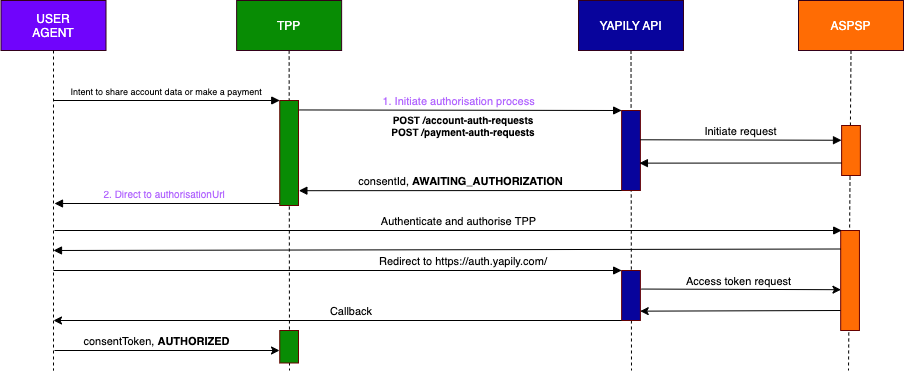 1. **Initiate the authorisation process**
Make a request to `POST /account-auth-requests` or `POST /payment-auth-requests`.
Yapily will return an `authorisationUrl`. The status of the authorisation is `AWAITING_AUTHORIZATION`.
1. **Initiate the authorisation process**
Make a request to `POST /account-auth-requests` or `POST /payment-auth-requests`.
Yapily will return an `authorisationUrl`. The status of the authorisation is `AWAITING_AUTHORIZATION`.
2. **Direct the end user to the `authorisationUrl`**
The end user is redirected to their bank to authenticate and authorise the consent request.
The bank then redirects the end user to the redirect URL. In this case `yapily.auth.com`. The end user will then be redirected after a few milliseconds to the specified callback URL.
During the redirect to Yapily, Yapily updates the consent object with the `consentToken`. This is returned directly to you in the callback.
The status of the authorisation is `AUTHORIZED`.
### Custom redirect URL
Single redirect flow using a custom [redirect URL](/open-banking-flow/handling-redirects/redirect-url):
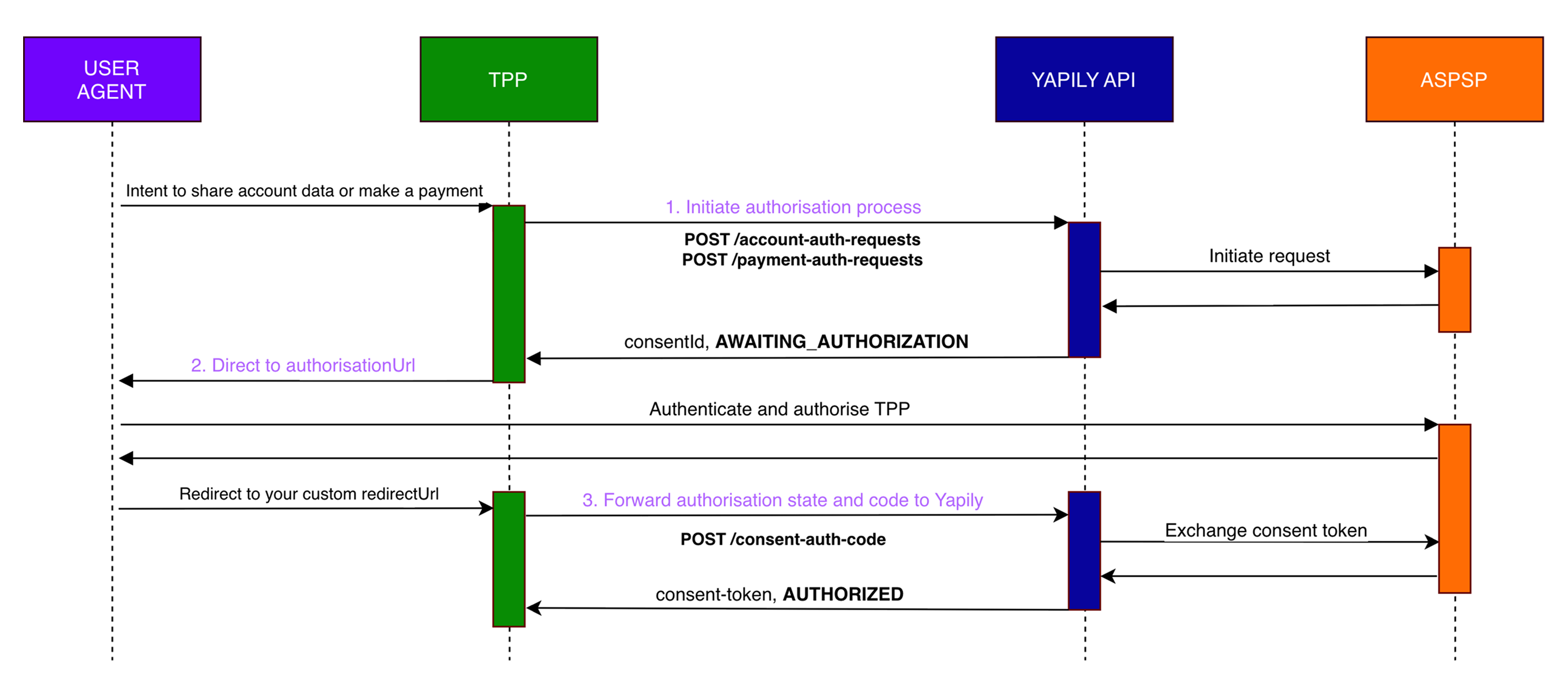 1. **Initiate the authorisation process**
Make a request to `POST /account-auth-requests` or `POST /payment-auth-requests`.
Yapily will return an `authorisationUrl`. The status of the consent is `AWAITING_AUTHORIZATION`.
1. **Initiate the authorisation process**
Make a request to `POST /account-auth-requests` or `POST /payment-auth-requests`.
Yapily will return an `authorisationUrl`. The status of the consent is `AWAITING_AUTHORIZATION`.
2. **Direct the end user to the `authorisationUrl`**
The end user is redirected to their bank to authenticate and authorise the consent request.
The bank then redirects the end user to your custom redirect URL. The bank will also send an authorisation state and code to you.
3. **Forward the authorisation state and code to Yapily**
Make a request to `POST /consent-auth-code`.
Yapily then exchanges this with the bank and returns the `consentToken` to you.
The status of the consent is `AUTHORIZED`.
### Poll for consent
Single redirect flow using the Yapily default [redirect URL](/open-banking-flow/handling-redirects/redirect-url) and polling for consent:
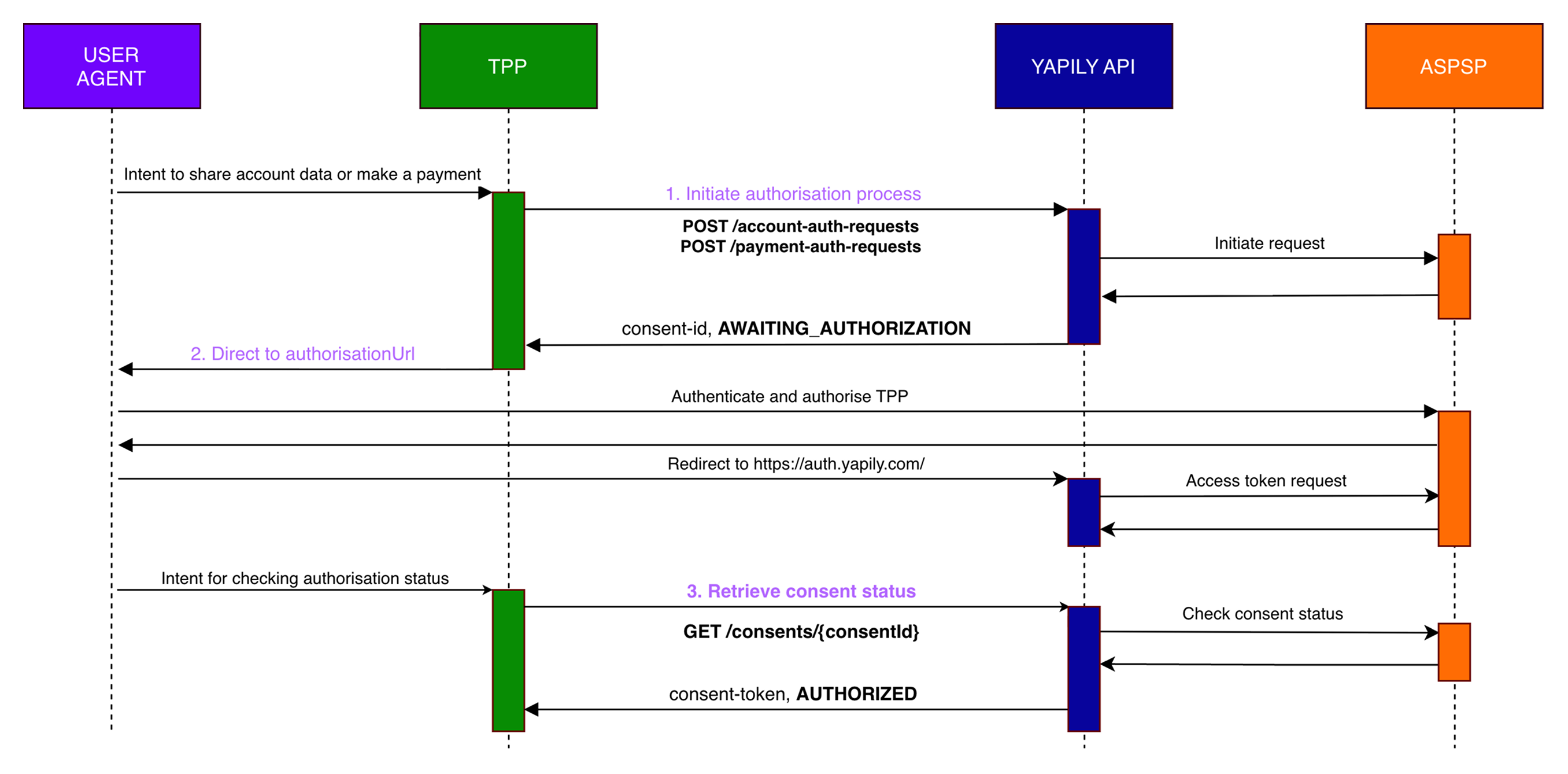 If you are using the Yapily default redirect URL, we recommend using a [callback URL](/open-banking-flow/handling-redirects/callback-url) to automatically receive the `consentToken`. However, you may wish to also poll for consent for additional validation.
1. **Initiate the authorisation process**
Make a request to `POST /account-auth-requests` or `POST /payment-auth-requests`.
Yapily will return an `authorisationUrl`. The status of the consent is `AWAITING_AUTHORIZATION`.
If you are using the Yapily default redirect URL, we recommend using a [callback URL](/open-banking-flow/handling-redirects/callback-url) to automatically receive the `consentToken`. However, you may wish to also poll for consent for additional validation.
1. **Initiate the authorisation process**
Make a request to `POST /account-auth-requests` or `POST /payment-auth-requests`.
Yapily will return an `authorisationUrl`. The status of the consent is `AWAITING_AUTHORIZATION`.
2. **Direct the end user to the `authorisationUrl`**
The end user is redirected to their bank to authenticate and authorise the consent request.
The bank then redirects the end user to the redirect URL. In this case, `yapily.auth.com`. During the redirect to Yapily, Yapily updates the consent object with the `consentToken`.
3. **Retrieve the `consentToken` and status**
Poll the result of GET Consent until the consent object is updated with the `consentToken` and the status of the consent transitions to `AUTHORIZED`.