> ## Documentation Index
> Fetch the complete documentation index at: https://docs.yapily.com/llms.txt
> Use this file to discover all available pages before exploring further.
# Pre-authorisation
> Guide to Yapily's pre-authorisation flow for obtaining consent before initiating payments or data requests. Ideal for scheduled and future-dated payment scenarios.
## Introduction
A pre-authorisation flow requires 2 separate authorisation steps. Firstly, the user must authenticate themselves with the bank. Secondly, the user gives consent to make a payment or share their financial data.
You must complete both steps of the flow for each new authorisation request to access financial data or make a payment.
Pre-authorisation flows most commonly require a user to be redirected to their bank to authenticate and give consent, however embedded authentication is also possible.
***
## One-time pre-authorisation
One-time pre-authorisation is an improved pre-authorisation flow that enables you to reuse the initial pre-authorisation for multiple authorisation requests.
The pre-authorisation remains valid until the expiry period. This means you can skip the pre-authorisation step when creating subsequent authorisation requests.
Where the `INITIATE_ONETIME_PRE_AUTHORIZATION` feature is supported, it also possible to collect a single pre-authorisation that is valid for both data and payment authorisation requests.
***
## Features
An institution using the pre-authorisation flow will support the following features:
#### Payments
At least 1 of:
* `INITIATE_PRE_AUTHORIZATION`
* `INITIATE_PRE_AUTHORIZATION_PAYMENTS`
* `INITIATE_ONETIME_PRE_AUTHORIZATION`
* `INITIATE_ONETIME_PRE_AUTHORIZATION_PAYMENTS`
AND at least 1 of:
* `INITIATE_DOMESTIC_SINGLE_PAYMENT`
* `INITIATE_DOMESTIC_PERIODIC_PAYMENT`
* `INITIATE_DOMESTIC_SCHEDULED_PAYMENT`
* `INITIATE_DOMESTIC_SINGLE_INSTANT_PAYMENT`
* `INITIATE_INTERNATIONAL_PERIODIC_PAYMENT`
* `INITIATE_INTERNATIONAL_SCHEDULED_PAYMENT`
* `INITIATE_INTERNATIONAL_SINGLE_PAYMENT`
* `INITIATE_BULK_PAYMENT`
#### Data
At least 1 of:
* `INITIATE_PRE_AUTHORIZATION`
* `INITIATE_ONETIME_PRE_AUTHORIZATION`
* `INITIATE_ONETIME_PRE_AUTHORIZATION_ACCOUNTS`
AND
* `INITIATE_ACCOUNT_REQUEST`
***
## Example flows
### Redirect pre-authorisation
Double redirect pre-authorisation flow using the Yapily default [redirect URL](/open-banking-flow/handling-redirects/redirect-url) and a [callback URL](/open-banking-flow/handling-redirects/callback-url):
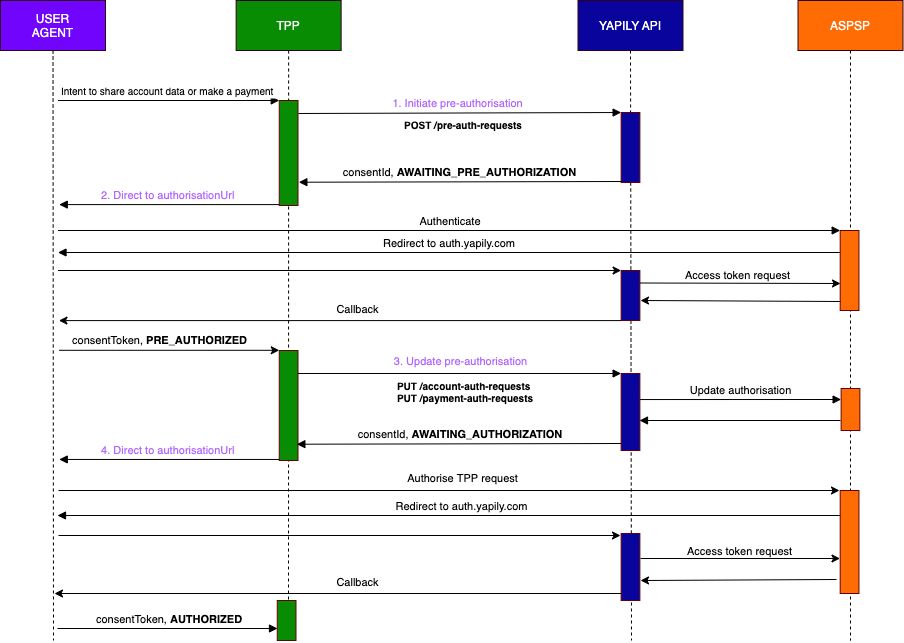 1. **Initiate pre-authorisation**
Make a request to `POST /pre-auth-requests`.
Yapily will return an `authorisationUrl`. The status of the authorisation is `AWAITING_PRE_AUTHORIZATION`.
1. **Initiate pre-authorisation**
Make a request to `POST /pre-auth-requests`.
Yapily will return an `authorisationUrl`. The status of the authorisation is `AWAITING_PRE_AUTHORIZATION`.
2. **Direct the end user to the `authorisationUrl`**
The end user is redirected to their bank to authenticate.
The bank then redirects the end user to the redirect URL. In this case `auth.yapily.com`. The end user will then be redirected after a few milliseconds to the specified callback URL.
During the redirect to Yapily, Yapily updates the consent object with the `consentToken`. This is returned directly to you in the callback.
The status of the authorisation is `PRE_AUTHORIZED`.
3. **Update the pre-authorisation**
Make a request to `PUT /account-auth-requests` or `PUT /payment-auth-requests`.
Yapily will return another `authorisationUrl`. The status is `AWAITING_AUTHORIZATION`.
4. **Direct the end user to the `authorisationUrl`**
The end user is redirected to their bank to authorise the account data access or payment request.
The bank then redirects the end user to the redirect URL. In this case `auth.yapily.com`. The end user will then be redirected after a few milliseconds to the specified callback URL.
During the redirect to Yapily, Yapily updates the consent object with the `consentToken`. This is returned directly to you in the callback.
The status of the authorisation is `AUTHORIZED`.
### One-time pre-authorisation
One-time pre-authorisation flow using the Yapily default [redirect URL](/open-banking-flow/handling-redirects/redirect-url) and a [callback URL](/open-banking-flow/handling-redirects/callback-url):
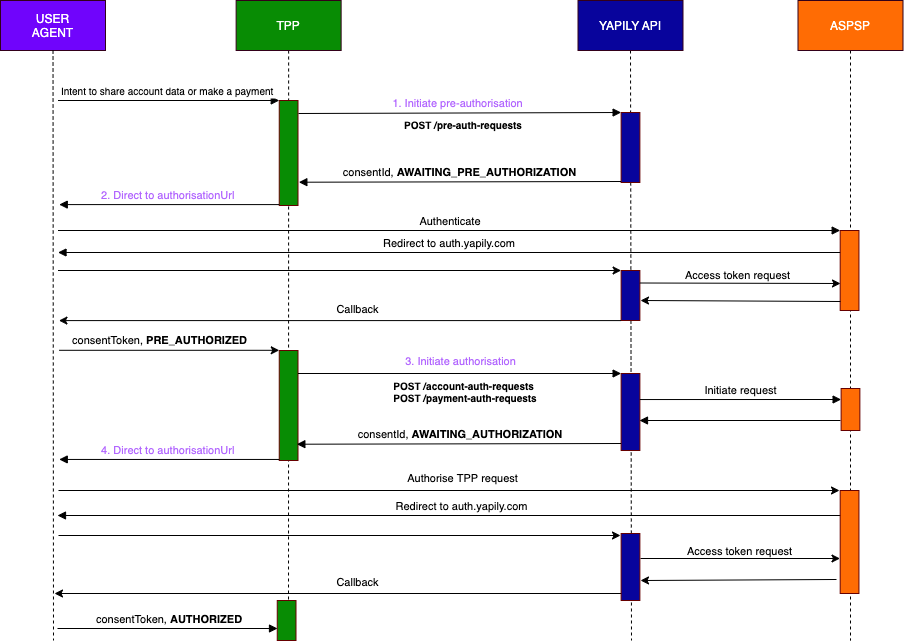 If you already have a valid pre-authorisation from the user, you can skip step 1 and 2 and immediately initiate an authorisation request.
1. **Initiate pre-authorisation**
Make a request to `POST /pre-auth-requests`.
Yapily will return an `authorisationUrl`. The status of the authorisation is `AWAITING_PRE_AUTHORIZATION`.
If you already have a valid pre-authorisation from the user, you can skip step 1 and 2 and immediately initiate an authorisation request.
1. **Initiate pre-authorisation**
Make a request to `POST /pre-auth-requests`.
Yapily will return an `authorisationUrl`. The status of the authorisation is `AWAITING_PRE_AUTHORIZATION`.
2. **Direct the end user to the `authorisationUrl`**
The end user is redirected to their bank to authenticate.
The bank then redirects the end user to the redirect URL. In this case `auth.yapily.com`. The end user will then be redirected after a few milliseconds to the specified callback URL.
During the redirect to Yapily, Yapily updates the consent object with the `consentToken`. This is returned directly to you in the callback.
The status of the authorisation is `PRE_AUTHORIZED`.
3. **Initiate the authorisation request**
Make a request to `POST /account-auth-requests` or `POST /payment-auth-requests`.
Yapily will return an `authorisationUrl`. The status is `AWAITING_AUTHORIZATION`.
4. **Direct the end user to the `authorisationUrl`**
The end user is redirected to their bank to authorise the account data access or payment request.
The bank then redirects the end user to the redirect URL. In this case `auth.yapily.com`. The end user will then be redirected after a few milliseconds to the specified callback URL.
During the redirect to Yapily, Yapily updates the consent object with the `consentToken`. This is returned directly to you in the callback.
The status of the authorisation is `AUTHORIZED`.
### Embedded pre-authorisation
This flow is not commonly used by institutions.
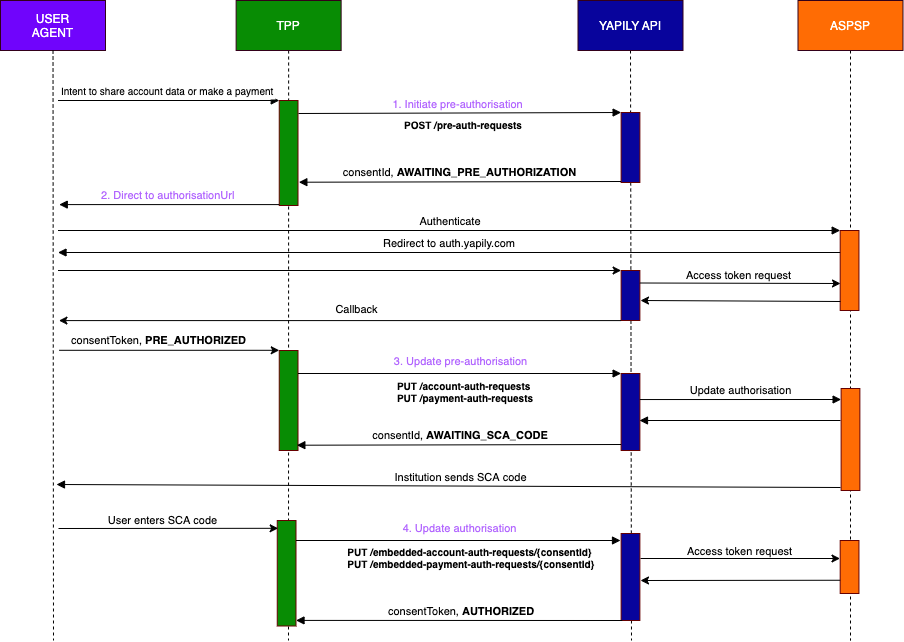 1. **Initiate pre-authorisation**
Make a request to `POST /pre-auth-requests`.
Yapily will return an `authorisationUrl`. The status of the authorisation is `AWAITING_PRE_AUTHORIZATION`.
1. **Initiate pre-authorisation**
Make a request to `POST /pre-auth-requests`.
Yapily will return an `authorisationUrl`. The status of the authorisation is `AWAITING_PRE_AUTHORIZATION`.
2. **Direct the end user to the `authorisationUrl`**
The end user is redirected to their bank to authenticate.
The bank then redirects the end user to the redirect URL. In this case `auth.yapily.com`. The end user will then be redirected after a few milliseconds to the specified callback URL.
During the redirect to Yapily, Yapily updates the consent object with the `consentToken`. This is returned directly to you in the callback.
The status of the authorisation is `PRE_AUTHORIZED`.
3. **Update the pre-authorisation**
Make a request to `PUT /account-auth-requests` or `PUT /payment-auth-requests`.
The status is `AWAITING_SCA_CODE`.
The bank will send the SCA code directly to the end user. You need to provide an input field to capture the code in your application.
4. **Update the authorisation with the SCA code**
Make a request to `PUT /embedded-account-auth-requests/{consentId}` or `PUT /embedded-payment-auth-requests/{consentId}` including the SCA code, to update the authorisation via Yapily.
Yapily returns the `consentToken` and the status is `AUTHORIZED`.