> ## Documentation Index
> Fetch the complete documentation index at: https://docs.yapily.com/llms.txt
> Use this file to discover all available pages before exploring further.
# Multiple Consents
> Manage multiple open banking consents with Yapily. Handle consent tokens, refresh expired consents, and support multi-bank authorisation in a single integration.
Yapily multiple consents represent the cases where the `Institution` returns more than one authorisation code, for example with AMEX, if the user
authorises their consent to share two or more accounts, AMEX will return a consent for each card.
We do not recommend executing account authorisation requests for AMEX without either using a `callback` or a custom redirect. If done so, if the user
authorises more than one AMEX account, you will only be able to track the first account authorised by the bank using the consent id (returned
in authorisation request response). Any extra consents will be created but you will not be able to receive the consent id for the additional
consents without using the callback or redirect.
## Use with a callback
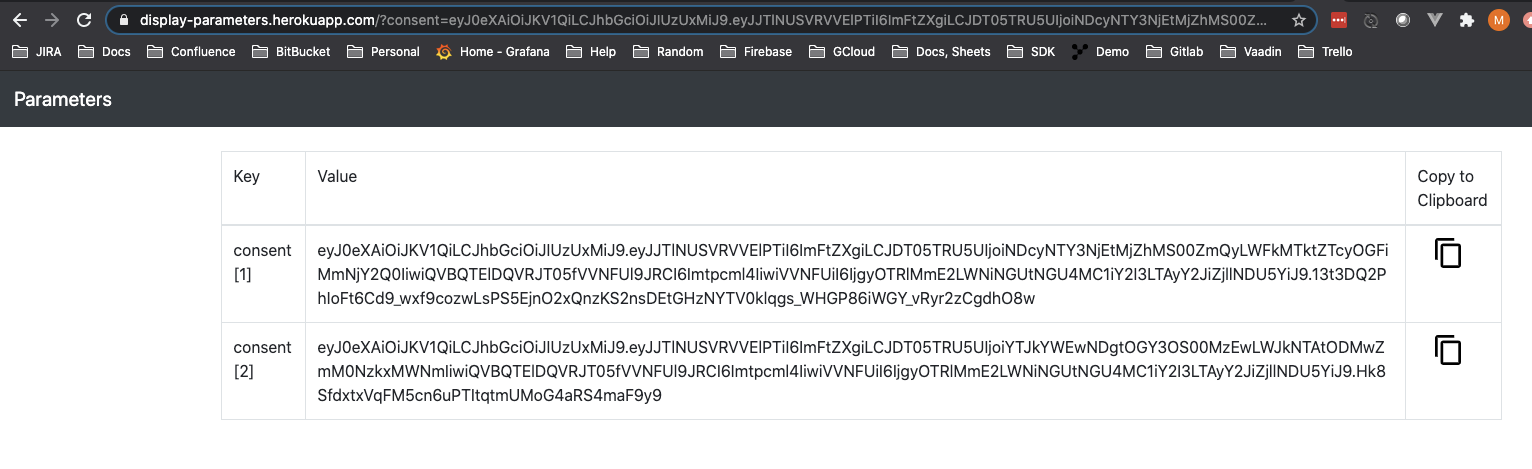
If you have created an authorisation request with a `callback` and the bank returns multiple consents, you will receive the consents as query parameters
at the `callback` in the format:
`?consent=\{value1\}&consent=\{value2\}...`
e.g.
```shell theme={null}
https://parameter-viewer.yapily.com/?consent=eyJ0eXAiOiJKV1QiLCJhbGciOiJIUzUxMiJ9.eyJJTlNUSVRVVElPTiI6ImFtZXgiLCJDT05TRU5UIjoiNDcyNTY3NjEtMjZhMS00ZmQyLWFkMTktZTcyOGFiMmNjY2Q0IiwiQVBQTElDQVRJT05fVVNFUl9JRCI6Imtpcml4IiwiVVNFUiI6IjgyOTRlMmE2LWNiNGUtNGU4MC1iY2I3LTAyY2JiZjllNDU5YiJ9.13t3DQ2PhIoFt6Cd9_wxf9cozwLsPS5Ejno2xQnzKS2nsDEtGHzNYTV0klqgs_WHGP86iWGY_vRyr2zCgdhO8w&consent=eyJ0eXAiOiJKV1QiLCJhbGciOiJIUzUxMiJ9.eyJJTlNUSVRVVElPTiI6ImFtZXgiLCJDT05TRU5UIjoiYTJkYWEwNDgtOGY3OS00MzEwLWJkNTAtODMwZmM0NzkxMWNmIiwiQVBQTElDQVRJT05fVVNFUl9JRCI6Imtpcml4IiwiVVNFUiI6IjgyOTRlMmE2LWNiNGUtNGU4MC1iY2I3LTAyY2JiZjllNDU5YiJ9.Hk8SfdxtxVqFM5cn6uPTItqtmUMoG4aRS4maF9y9
```
## Use with a redirect url
This section only applies if you have your own Open Banking AISP/PISP licenses and are using your own certificates to register with each Yapily
`Institution`. See [Redirect Url](/open-banking-flow/handling-redirects/redirect-url) for more information.
For AMEX, the response at the redirect will contain multiple comma separated `authToken` values and one `state`:
`?authToken=\{value1\},\{value2\}...&state=\{value\}`
e.g.
```shell theme={null}
https://auth.yapily.com/?authtoken=7e7c7380-a478-4b99-8ed1-c39c366bfe62,15ab2305-744c-41d7-a891-f05dfc2704bc&state=05c6e92e736840c193fcf9c05778a727
```
You will then need to execute (Forwarding) [Send OAuth2 Code](/api-reference/consents/exchange-oauth2-code) for each `authToken` with the
same state to retrieve a `consentToken` for each of the user's accounts that have been authorised for sharing.
## Use with one-time-token
Similarly, when you also specify to use a `one-time-token` in the authorisation request and the bank returns multiple consents, you will get one-time
tokens as query parameters at the `callback` in the format:
`?one-time-token=\{value1\}&one-time-token=\{value2\}...`
e.g.
```shell theme={null}
https://parameter-viewer.yapily.com/?one-time-token=eyJ0eXAiOiJKV1QiLCJhbGciOiJIUzUxMiJ9.eyJJTlNUSVRVVElPTiI6ImFtZXgiLCJVVUlEIjoiNjU4oThmOWEtNjcyNi00OGQxLWI2MTctYmE0NjUwODFkZTY3IiwiZXhwIjoxNjAzMjEwNjUyfQ.uvCCx_DLN2A0SvVNmPdMkfTF7j1q6A_x5VREq5yFzdJO636WPSLvIBNa96AG9rwC8Lb3BVNb4RoJ0RvpAjHntA&one-time-token=eyJ0eXAiOiJKV1QiLCJhbGciOiJIUzUxMiJ9.eyJJTlNUSVRVVElPTiI6ImFtZXgiLCJVVUlEIjoiNzI3ODlmNTAtMjIyMC00MzMxLWFmNmYtODIyMGFiYzYwNGE1IiwiZXhwIjoxNjAzMjEwNjUzfQ.sAeY1VSs2C1EvtMWsFvev_xXwwwrv7K9htqxNe6LfCMnES6tbrkZBrAr2XktsE4En4lGn8qcBjbSb0UgwgL6LA
```

You will then need to execute [Exchange One Time Token](/api-reference/consents/exchange-one-time-token) for each `one-time-token` to retrieve a `consentToken` for
each of the user's accounts that have been authorised for sharing.