> ## Documentation Index
> Fetch the complete documentation index at: https://docs.yapily.com/llms.txt
> Use this file to discover all available pages before exploring further.
# Embedded
> Guide to Yapily's embedded authorisation flow. Allow users to authorise payments or data access directly within your application without external bank redirects.
## Introduction
In an embedded authorisation flow a user's credentials are captured before the bank sends a Strong Customer Authentication (SCA) code to the user which is also captured in your frontend application and sent back to the institution via Yapily. There is no redirect to the bank itself.
***
## Features
An institution using the embedded flow will support the following features:
**Payments**
* `INITIATE_EMBEDDED_DOMESTIC_SINGLE_PAYMENT`
* `INITIATE_EMBEDDED_BULK_PAYMENT`
**Data**
* `INITIATE_EMBEDDED_ACCOUNT_REQUEST`
***
## Example flow
Embedded flow with multiple SCA methods:
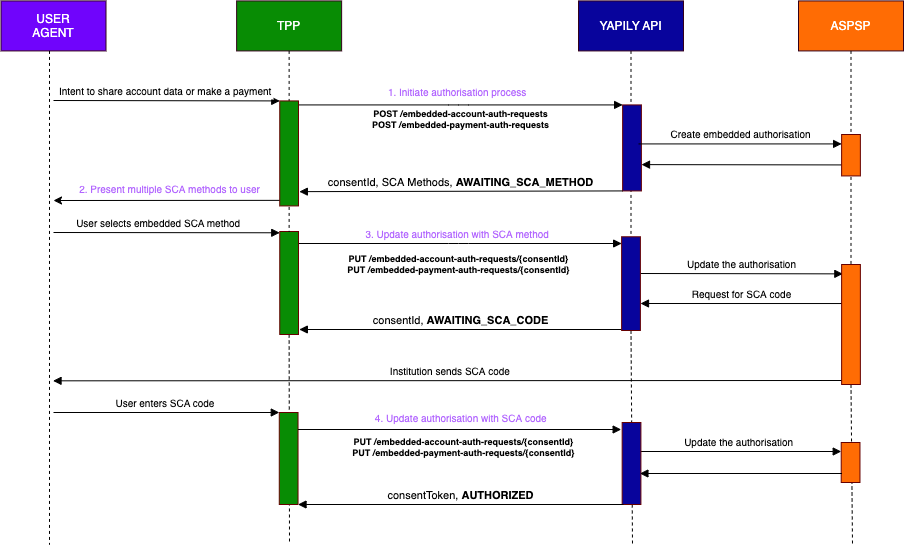 1. **Initiate the authorisation process**
Make a request to `POST /embedded-account-auth-requests` or `POST /embedded-payment-auth-requests`.
If multiple SCA methods are available, you will receive a list of the SCA methods sent by the bank and the status is `AWAITING_SCA_METHOD`.
* If only 1 `SCA_METHOD` is available, the status will transition directly to `AWAITING_SCA_CODE`. In this case, you don't need to complete step 2 or 3 as the `SCA_CODE` will be sent immediately by the bank to the end user once the embedded account authorisation is initiated.
* For some payments, SCA may be exempted. In such cases, no further SCA steps (such as selecting an SCA method or submitting an SCA code) are required, and the status will transition directly to `AUTHORIZED`.
2. **Present the list of SCA methods to the end user**
You must display the list of available SCA methods to the end user in your frontend application so they can select the method they would like the bank to use to contact them.
1. **Initiate the authorisation process**
Make a request to `POST /embedded-account-auth-requests` or `POST /embedded-payment-auth-requests`.
If multiple SCA methods are available, you will receive a list of the SCA methods sent by the bank and the status is `AWAITING_SCA_METHOD`.
* If only 1 `SCA_METHOD` is available, the status will transition directly to `AWAITING_SCA_CODE`. In this case, you don't need to complete step 2 or 3 as the `SCA_CODE` will be sent immediately by the bank to the end user once the embedded account authorisation is initiated.
* For some payments, SCA may be exempted. In such cases, no further SCA steps (such as selecting an SCA method or submitting an SCA code) are required, and the status will transition directly to `AUTHORIZED`.
2. **Present the list of SCA methods to the end user**
You must display the list of available SCA methods to the end user in your frontend application so they can select the method they would like the bank to use to contact them.
3. **Update the authorisation with the selected SCA method**
Make a request to `PUT /embedded-account-auth-requests/{consentId}` or `PUT /embedded-payment-auth-requests/{consentId}` including the selected SCA method, to update the bank via Yapily. The status is `AWAITING_SCA_CODE`.
The bank will send the SCA code directly to the end user via the preferred method. You need to provide an input field to capture the code in your application.
4. **Update the authorisation with the SCA code**
Make a request to `PUT /embedded-account-auth-requests/{consentId}` or `PUT /embedded-payment-auth-requests/{consentId}` including the SCA code, to update the authorisation via Yapily.
Yapily returns the `consentToken` and the status is `AUTHORIZED`.