> ## Documentation Index
> Fetch the complete documentation index at: https://docs.yapily.com/llms.txt
> Use this file to discover all available pages before exploring further.
# Callback URL
> Set up and handle callback URLs in Yapily integrations. Process the authorisation code returned after user consent and exchange it for a consent token.
## Introduction
The callback URL specifies where the user should be redirected after they have been redirected to the redirect URL by the bank.
In addition, it returns query parameters detailing whether the user's authorisation was successful or not.
The callback URL is an optional property. Whether you use the callback URL depends whether you use `https://auth.yapily.com/` as your redirect URL:
* `https://auth.yapily.com/`: You should use the callback URL to redirect the user back to your application server following the initial redirect from the bank.
**Note:** This will be the case if you are a [Yapily Connect](/tools-and-services/yapily-connect/overview) customer.
* Custom [redirect URL](/open-banking-flow/handling-redirects/redirect-url): You shouldn't use the callback URL as the user will be redirected directly to your application server from the bank.
***
## Benefits
There are 2 main benefits of using a callback URL:
1. **Direct access to the user's response.** You don't need to poll the status of the `Consent` after creating the authorisation request.
2. **A better user experience.** You can end the authorisation journey back in your application rather than at Yapily's redirect URL.
**Note:** It is important that the server you point the `callback` to responds quickly, below 100ms. Otherwise, the browser will hang at `https://auth.yapily.com/` for the amount of time that the service on the `callback` takes to process and respond, creating a bad experience for the user.
***
## Specifying the callback URL
You must specify your callback URL in the `callback` field in the body of each [authorisation request](/api-reference/authorisations/create-account-authorisation).
The following diagram shows the authorisation flow using a callback URL:

### Using a OTT
You can optionally specify in the authorisation request to use a `oneTimeToken` when using a `callback`.
In this case, you receive a short lived token which you must exchange using [POST Exchange One Time Token](/api-reference/consents/exchange-one-time-token) to obtain the `consentToken`. This provides an additional level of security as the `consentToken` is not exposed as a query parameter to your `callback`.
The following diagram shows the authorisation flow using a OTT:

### Custom callback parameters
To consume custom data at the callback, you can specify an authorised `callback` value when creating a authorisation request with additional custom query parameters.
For example, if you wanted to pass through the time of the request, you could specify `https://tpp-application/?time=1335` as the `callback` in the authorisation request. This query parameter will be available along with the default ones after the user responds to the request at the bank.
### Sample callback URL
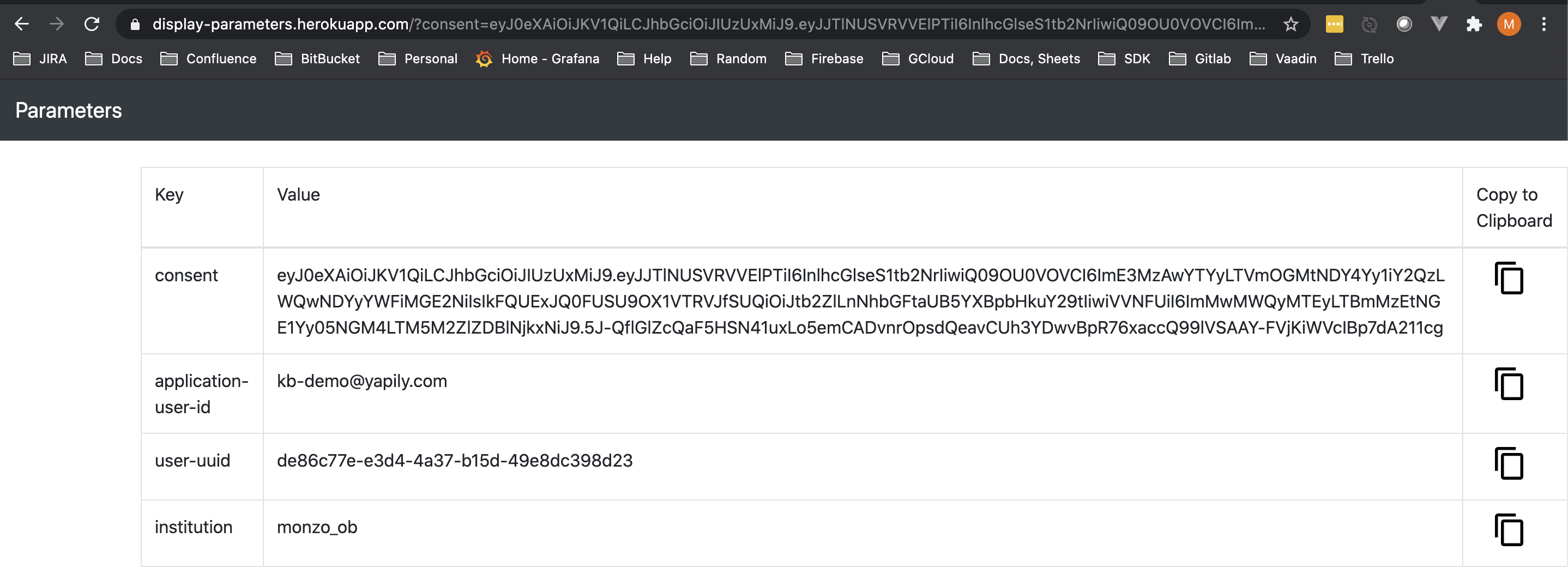
If you don't yet have an front-end application to use for your callback URL, you can specify the utility ([https://display-parameters.com/](https://display-parameters.com)) as your callback.
This utility displays a table containing the query parameters returned to the callback URL.
***
## Deep-linking for applications
#### Mobile
On mobile you can specify a [deep link](https://en.wikipedia.org/wiki/Mobile_deep_linking) `callback`. This enables users to open your application after leaving the bank.
**Note:** When a deep link has a custom URI scheme (not `http` or `https`) it will link to
content that can only be accessed if the application is installed on the device.
#### Web and mobile
For journeys including web and mobile, you can use [App Links](https://developer.android.com/training/app-links/index.html#add-app-links) for Android and [Universal Links](https://developer.apple.com/ios/universal-links/) for iOS.
Both are special types of deep links that you can set as your callback, but these must use either the `http` or `https` URI schemes.
The benefit of these deep links is that, in addition to opening your mobile app if it is installed, they also enable deferred deep-linking. This means, if the mobile app is not installed, rather than failing, it redirects the user to where they can install your app and then continues the journey in your app when it is installed.
***
## Handling the callback parameters
#### Success query parameters
If the user successfully authorises the authorisation request, the callback returns the following query parameters:
* `consent` - the `consentToken` which you can use to execute the payment or retrieve the user's account information
* `application-user-id` - the user-friendly ID for the user who receives the authorisation request (if specified)
* `user-uuid` - the Yapily generated ID for the user who receives the authorisation request
* `institution` - the institution that the user used for the authorisation request
#### Failure query parameters
If the authorisation fails a different set of query parameters are returned to help explain what has occurred:
* `application-user-id` - the user-friendly ID for the user who receives the authorisation request (if specified)
* `user-uuid` - the Yapily generated ID for the user who receives the authorisation request
* `institution` - the institution that the user used for the authorisation request
* `error-source` - the high-level source of where the error has occurred
* `error` - the high-level error code summarising what has occurred
* `error-description` - the description of the failure sent by the bank and base64 encoded
| error-source | error | error from the institution |
| ------------ | -------------------------- | ---------------------------- |
| user | access\_denied | access\_denied |
| user | access\_denied | user\_cancelled |
| user | access\_denied | login\_required |
| user | access\_denied | account\_selection\_required |
| user | access\_denied | interaction\_required |
| institution | invalid\_grant | invalid\_grant |
| institution | invalid\_grant | consent\_required |
| institution | invalid\_grant | server\_error |
| institution | invalid\_grant | temporarily\_unavailable |
| institution | invalid\_grant | request\_not\_supported |
| institution | invalid\_grant | request\_uri\_not\_supported |
| institution | institution\_server\_error | invalid\_request |
| institution | institution\_server\_error | registration\_not\_supported |
| institution | institution\_server\_error | unauthorized\_client |
| institution | institution\_server\_error | unsupported\_grant\_type |
| institution | institution\_server\_error | invalid\_scope |
| institution | configuration\_error | invalid\_client |
| institution | uncategorized\_error | - |